

最近在升級完善 WordPress大學(xué) 現(xiàn)在用的主題,需要調(diào)用數(shù)指定文章類型的文章數(shù)量,找到了 wp_count_posts() 函數(shù),很方便就實現(xiàn)了。
wp_count_posts() 介紹
wp_count_posts() 函數(shù)是用來計算文章類型的文章數(shù)量的,還可以設(shè)置用戶是否有權(quán)查看。有兩個可用參數(shù):
wp_count_posts( string $type = 'post', string $perm = '' )- $type :字符串,可選 。獲取指定的文章類型的文章數(shù),默認為:
'post',可以填寫文章類型的名稱。 - $perm : 字符串,可選 。檢查“可讀”值,如果用戶可以閱讀私密文章,它將為登錄用戶顯示該文章。 可選值
readable或 空,默認為空''
獲取默認文章的文章數(shù)
如果我們要調(diào)用默認的 文章 的文章數(shù)量,可以使用下面的代碼:
$count_posts = wp_count_posts(); //里面沒有參數(shù),默認為 post

if ( $count_posts ) {
    $published_posts = $count_posts->publish;
}
wp_count_posts() 函數(shù)返回的是一個數(shù)組,里面可能包含數(shù)據(jù)為:
stdClass Object ( [publish] => 12 [future] => 0 [draft] => 0 [pending] => 0 [private] => 0 [trash] => 1 [auto-draft] => 1 [inherit] => 0 [request-pending] => 0 [request-confirmed] => 0 [request-failed] => 0 [request-completed] => 0 ) 1從中可以看到,可以針對文章的發(fā)布狀態(tài)進行顯示。比如在上面的示例代碼中,我們采用 $count_posts->publish; 返回的是已發(fā)布的文章數(shù)量。
獲取自定義文章類型的文章數(shù)
上面我們已經(jīng)介紹了, wp_count_posts() 函數(shù)的第一個參數(shù)是文章類型名稱,可以是 post、page 等這種內(nèi)置的文章類型,也可以是自定義的文章類型。
那么,如果知道文章類型的名稱呢,有一個比較直觀的辦法就是,在后臺訪問這個文章類型的管理界面:
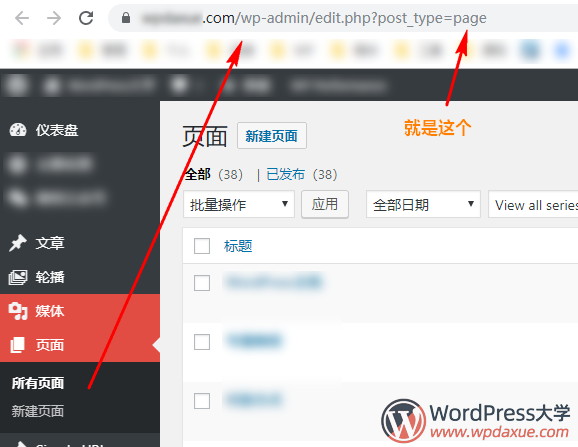
然后我們就可以在網(wǎng)址欄中看到 post_type=page ,那么 page 就是這個文章類型名稱了。
專業(yè)一點的話,我們需要去找到這個自定義文章類型的注冊代碼,在這里需要大家去腦補一下自定義文章類型的注冊方式:
下面是一個官方的示例:
add_action( 'init', 'codex_book_init' );
/**
 * Register a book post type.
 *
 * @link http://codex.wordpress.org/Function_Reference/register_post_type
 */
function codex_book_init() {
	$labels = array(
		'name'               => _x( 'Books', 'post type general name', 'your-plugin-textdomain' ),
		'singular_name'      => _x( 'Book', 'post type singular name', 'your-plugin-textdomain' ),
		'menu_name'          => _x( 'Books', 'admin menu', 'your-plugin-textdomain' ),
		'name_admin_bar'     => _x( 'Book', 'add new on admin bar', 'your-plugin-textdomain' ),
		'add_new'            => _x( 'Add New', 'book', 'your-plugin-textdomain' ),
		'add_new_item'       => __( 'Add New Book', 'your-plugin-textdomain' ),
		'new_item'           => __( 'New Book', 'your-plugin-textdomain' ),
		'edit_item'          => __( 'Edit Book', 'your-plugin-textdomain' ),
		'view_item'          => __( 'View Book', 'your-plugin-textdomain' ),
		'all_items'          => __( 'All Books', 'your-plugin-textdomain' ),
		'search_items'       => __( 'Search Books', 'your-plugin-textdomain' ),
		'parent_item_colon'  => __( 'Parent Books:', 'your-plugin-textdomain' ),
		'not_found'          => __( 'No books found.', 'your-plugin-textdomain' ),
		'not_found_in_trash' => __( 'No books found in Trash.', 'your-plugin-textdomain' )
	);

	$args = array(
		'labels'             => $labels,
		'description'        => __( 'Description.', 'your-plugin-textdomain' ),
		'public'             => true,
		'publicly_queryable' => true,
		'show_ui'            => true,
		'show_in_menu'       => true,
		'query_var'          => true,
		'rewrite'            => array( 'slug' => 'book' ),
		'capability_type'    => 'post',
		'has_archive'        => true,
		'hierarchical'       => false,
		'menu_position'      => null,
		'supports'           => array( 'title', 'editor', 'author', 'thumbnail', 'excerpt', 'comments' )
	);

	register_post_type( 'book', $args );
}
注意看倒數(shù)的 register_post_type( 'book', $args ); 里面的 book 就是文章類型的名稱。所以,如果我們要調(diào)用 book 這個文章類型的文章數(shù)量,可以使用下面的代碼:
$count_posts = wp_count_posts('book'); //參數(shù)填寫為 book

if ( $count_posts ) {
    $published_posts = $count_posts->publish;
}
好了,就是這樣!
拓展閱讀:
- wp_count_posts()
- 實例講解 WordPress 自定義文章類型
- WordPress函數(shù):count_user_posts 獲取用戶文章數(shù)
- WordPress 獲取今天/最近24小時發(fā)布的文章數(shù)量



