

Twenty Twenty-Four 是全新的默認(rèn)WordPress 主題,將隨下一個(gè) WordPress 6.4 版本一起提供。
Twenty Twenty-Four 主題背后的想法是適合任何類型網(wǎng)站的默認(rèn)主題,無(wú)論網(wǎng)站的主題是什么。該主題專為三種用例量身定制:小企業(yè)主、攝影師和藝術(shù)家、作家和博主。
Twenty Twenty-Four 不僅僅是一個(gè)主題,它是模板和樣板的集合,它們組合在一起,使您能夠構(gòu)建各種網(wǎng)站。因此,您可以將Twenty Twenty-Four視為一個(gè)多用途主題,盡管它絕對(duì)是一個(gè)最小的主題。
正如您所期望的,Twenty Twenty-Four 是一個(gè)塊主題,與 WordPress 6.4 附帶的所有精彩內(nèi)容完全兼容,包括詳細(xì)信息塊和垂直文本。
在快速介紹新的 WordPress 默認(rèn)主題之后,在本文中,我們將探索許多模板、樣板和樣式,向您展示如何使用 Twenty Twenty-Four 構(gòu)建一個(gè)有吸引力的、響應(yīng)式的、可用的和可訪問的網(wǎng)站。
現(xiàn)在,啟動(dòng)站點(diǎn)編輯器,輸入Cmd + k,然后輸入Templates。

WordPress 主題 Twenty Twenty-Four
Twenty Twenty-Four 為我們提供了 WordPress 塊主題的完美示例。當(dāng)您訪問WordPress 安裝中的主題文件夾時(shí),您會(huì)發(fā)現(xiàn)一個(gè)非常簡(jiǎn)單的 functions.php 文件,其唯一目的是將特定塊的一些樣式表排入隊(duì)列。
Twenty Twenty-Four 函數(shù)文件是一個(gè)很好的示例,說(shuō)明如何優(yōu)化主題,確保僅在需要時(shí)嵌入特定資源。僅當(dāng)按鈕位于頁(yè)面上時(shí),以下代碼才會(huì)將Button-outline.css樣式表排入隊(duì)列:
if ( ! function_exists( 'twentytwentyfour_block_styles' ) ) :
	/**
	 * Register custom block styles
	 *
	 * @return void
	 * @since Twenty Twenty-Four 1.0
	 *
	 */
	function twentytwentyfour_block_styles() {
		/**
		 * The wp_enqueue_block_style() function allows us to enqueue a stylesheet
		 * for a specific block. These will only get loaded when the block is rendered
		 * (both in the editor and on the front end), improving performance
		 * and reducing the amount of data requested by visitors.
		 *
		 * See https://make.wordpress.org/core/2021/12/15/using-multiple-stylesheets-per-block/ for more info.
		 */
		wp_enqueue_block_style(
			'core/button',
			array(
				'handle' => 'twentytwentyfour-button-style-outline',
				'src'    => get_template_directory_uri() . '/assets/css/button-outline.css',
				'ver'    => wp_get_theme()->get( 'Version' ),
			)
		);
	}
	...
endif;
該主題不會(huì)為您的 WordPress 網(wǎng)站提供任何功能,您將完全依賴插件向頁(yè)面添加行為。所以 Twenty Twenty-Four 的functions.php文件只負(fù)責(zé)將特定塊的特定樣式表排入隊(duì)列。
繼續(xù)探索 Twenty Twenty-F??our 主題文件夾,您會(huì)注意到style.css文件僅包含一個(gè)標(biāo)頭,其中包含主題正常工作所需的詳細(xì)信息,并且不包含任何 CSS 塊:
/*
Theme Name: Twenty Twenty-Four
Theme URI: https://wordpress.org/themes/twentytwentyfour
Author: the WordPress team
Author URI: https://wordpress.org
Description: Twenty Twenty-Four is designed to be flexible, versatile, and applicable to any website. Its collection of templates and patterns is tailored to different needs, such as presenting a business, blogging, and writing or showcasing work. A multitude of possibilities open up with just a few adjustments to color and typography. Twenty Twenty-Four comes with style variations and full-page designs to help speed up the site-building process, is fully compatible with the site editor, and takes advantage of new design tools introduced in WordPress 6.4.
Requires at least: 6.2
Tested up to: 6.4
Requires PHP: 7.0
Version: 1.0
License: GNU General Public License v2 or later
License URI: http://www.gnu.org/licenses/gpl-2.0.html
Text Domain: twentytwentyfour
Tags: one-column, custom-colors, custom-menu, custom-logo, editor-style, featured-images, full-site-editing, block-patterns, rtl-language-support, sticky-post, threaded-comments, translation-ready, wide-blocks, block-styles, style-variations, accessibility-ready, blog, portfolio, news
*/您還會(huì)發(fā)現(xiàn)一個(gè)asset文件夾,其中包含一個(gè)fonts文件夾、一組images和一個(gè)css文件夾,其中包含button-outline.css樣式表。
Twenty TwentyFour 的默認(rèn)樣式使用兩種字體:用于標(biāo)題的Cardo和用于其他文本元素的Inter。

Jost和Instrument Sans字體系列也可用,并用于多種風(fēng)格變體。
接下來(lái),您將找到四個(gè)文件夾,其中包含 Twenty Twenty-Four 默認(rèn)主題的真正精華:
- 樣式(styles)
- 樣板(patterns)
- 部分(parts)
- 模板(templates)
全局樣式

Twenty Twenty-Four 帶有一組六種不同樣式變化的組合。您可以在站點(diǎn)編輯器的“樣式”部分或編輯模式下的“瀏覽樣式”面板中探索每種樣式。

默認(rèn)樣式在theme.json中定義,并帶有 11 種顏色、12 種漸變、5 種雙色調(diào)顏色組合和兩個(gè)字體系列:Inter 用于內(nèi)容正文,Cardo 用于標(biāo)題。

每個(gè)變體都添加了特定的風(fēng)格組合。
在撰寫本文時(shí),Twenty Twenty-Four 具有以下風(fēng)格變化:
Ice:此變體與默認(rèn)樣式非常相似。它使用相同的默認(rèn)調(diào)色板,標(biāo)題使用系統(tǒng)字體,正文使用 Inter。

Milky:此變體具有相同的默認(rèn)字體系列,但具有不同的調(diào)色板。

Mint: Mint 在調(diào)色板和字體系列中添加了變化。它使用 Instrument Sans 表示標(biāo)題,使用 Jost 表示正文。

Onyx:這是默認(rèn)樣式的深色版本。它添加了自定義調(diào)色板、漸變和雙色調(diào)組合。
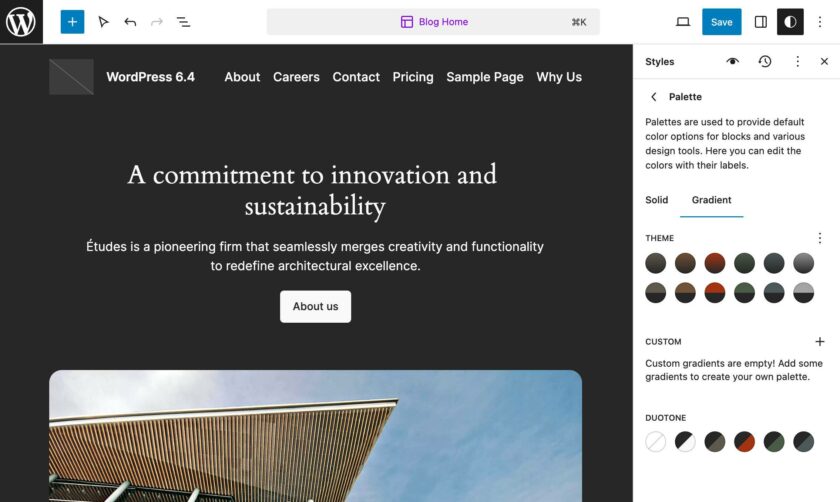
Rust: Rust 使用令人愉悅的調(diào)色板。排版基于默認(rèn)字體系列,但字體大小不同。
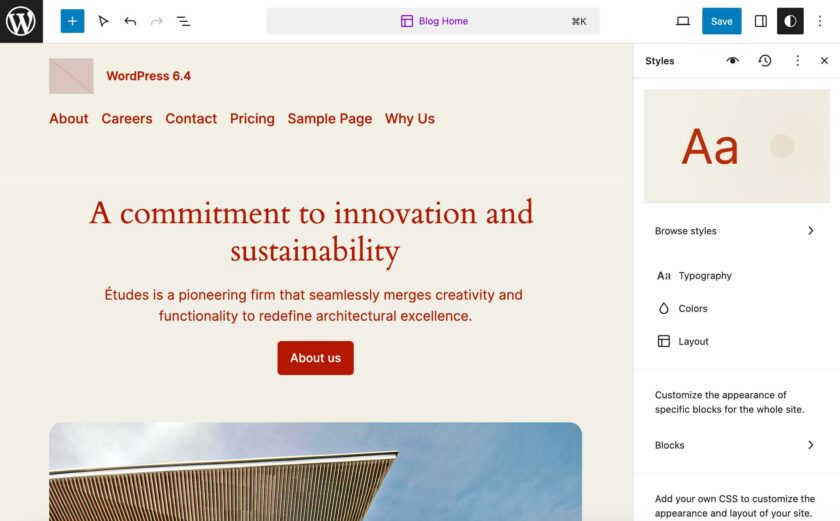
Sandstorm:此變體更改了默認(rèn)樣式的多個(gè)元素。Sandstorm 定義了 11 種調(diào)色板,使用 Instrument Sans 和 Jost 字體系列,并自定義了多個(gè)塊和 HTML 元素的外觀。

模板
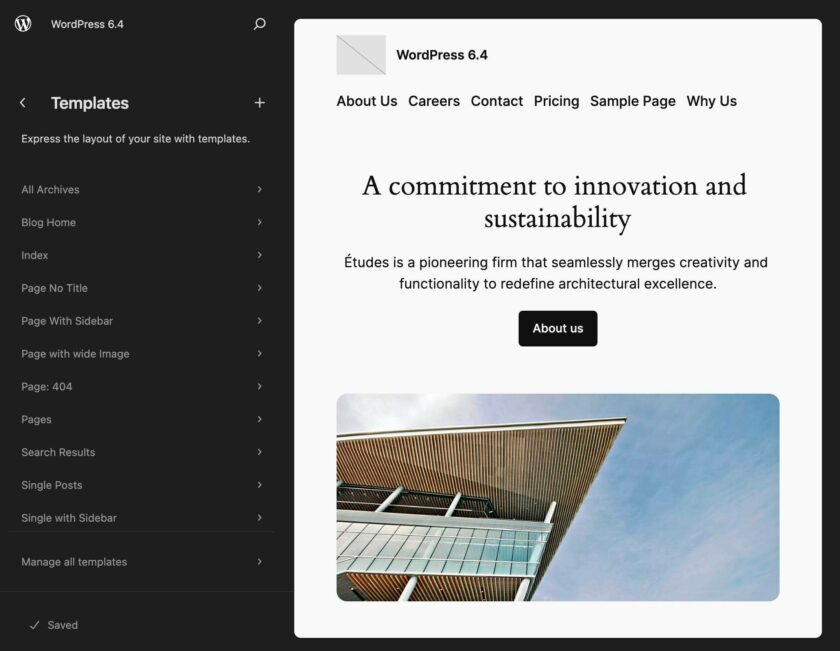
Twenty Twenty-Four 帶有十一個(gè)內(nèi)置模板。您可以在主題目錄的templates文件夾中找到相應(yīng)的文件:
- single.html
- single-with-sidebar.html
- search.html
- page.html
- page-with-sidebar.html
- page-wide.html
- page-no-title.html
- index.html
- home.html
- archive.html
- 404.html
您可以在站點(diǎn)編輯器的模板部分中訪問自定義模板列表。
現(xiàn)在再說(shuō)一遍,如果您想深入研究 Twenty Twenty-Four 模板的代碼,您只需在您最喜歡的代碼編輯器中打開其中一兩個(gè)即可。每個(gè)模板都包含一個(gè)或多個(gè)模式也就不足為奇了。這再次證明了 Twenty Twenty-Four 或多或少是一個(gè)樣板的集合。
以index.html為例并在編輯器中打開它。您應(yīng)該看到以下代碼:
<!-- wp:group {"style":{"position":{"type":"sticky","top":"0px"}},"layout":{"type":"default"}} -->
<div class="wp-block-group">
	<!-- wp:template-part {"slug":"header"} /-->
</div>
<!-- /wp:group -->

<!-- wp:group {"tagName":"main","align":"full","layout":{"type":"constrained"}} -->
<main class="wp-block-group alignfull">
	<!-- wp:heading {"level":1,"align":"wide","style":{"spacing":{"padding":{"top":"var:preset|spacing|50"}}}} -->
	<h1 class="wp-block-heading alignwide" style="padding-top:var(--wp--preset--spacing--50)">Posts</h1>
	<!-- /wp:heading -->
	<!-- wp:pattern {"slug":"twentytwentyfour/posts-three-columns"} /-->
</main>
<!-- /wp:group -->

<!-- wp:template-part {"slug":"footer","area":"footer","tagName":"footer"} /-->模板以包含header模板部分的div開頭。 main 具有標(biāo)題和posts-three-columns 樣板的元素生成正文,而footer模板部分構(gòu)建頁(yè)面的底部。
現(xiàn)在讓我們比較一下index.html和archive.html:
<!-- wp:group {"style":{"position":{"type":"sticky","top":"0px"}},"layout":{"type":"default"}} -->
<div class="wp-block-group">
	<!-- wp:template-part {"slug":"header"} /-->
</div>
<!-- /wp:group -->

<!-- wp:group {"tagName":"main","align":"full","layout":{"type":"constrained"}} -->
<main class="wp-block-group alignfull">

	<!-- wp:query-title {"type":"archive","align":"wide","style":{"typography":{"lineHeight":"1"},"spacing":{"padding":{"top":"var:preset|spacing|50"}}}} /-->

	<!-- wp:pattern {"slug":"twentytwentyfour/posts-three-columns"} /-->

</main>
<!-- /wp:group -->

<!-- wp:template-part {"slug":"footer","area":"footer","tagName":"footer"} /-->您會(huì)注意到這兩個(gè)模板非常相似。唯一的區(qū)別是archive.html使用Archive 標(biāo)題塊而不是 H1 元素。這兩個(gè)模板都使用posts-three-columns樣板來(lái)生成頁(yè)面的內(nèi)容。
從 HTML 編輯器切換到 WordPress 網(wǎng)站編輯器,您可以預(yù)覽和自定義主題的模板。下圖顯示了編輯樣板下的存檔模板。
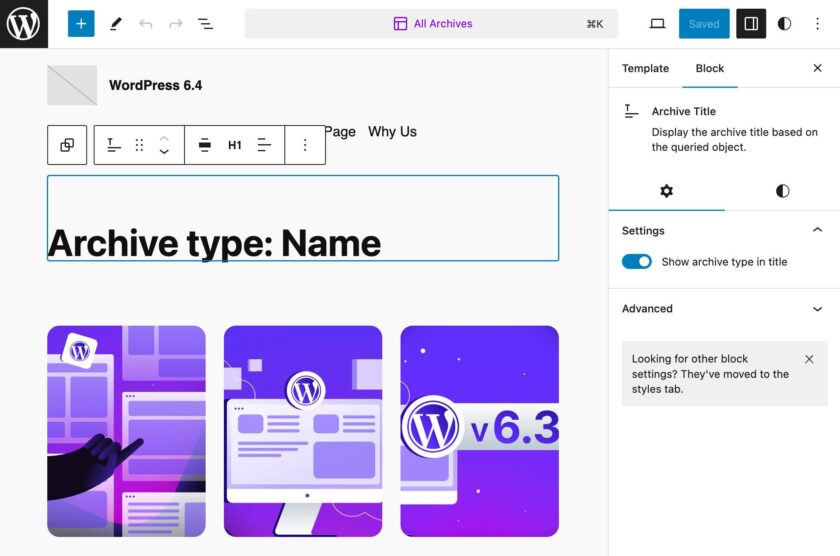
對(duì)更改感到滿意后,單擊右上角的“保存” 。這將顯示一個(gè)新面板,您可以在其中確認(rèn)更改或放棄它們。再次單擊“保存”,即可完成。
模板部分和樣板

您可以在 Twenty Twenty-Four 目錄的兩個(gè)不同文件夾中找到樣板和模板部件。樣板文件夾包含超過50 個(gè)樣板,而部分文件夾包含六個(gè)模板部分。
在站點(diǎn)編輯器中,模板部分和樣板都包含在同一樣板部分中。
Twenty Twenty-Four 提供了多種可用于構(gòu)建整個(gè)頁(yè)面的樣板。這簡(jiǎn)化了編輯工作流程,并允許您通過很少的自定義來(lái)構(gòu)建整個(gè)網(wǎng)站。
示例包括“關(guān)于”樣板類別下列出的“主頁(yè)”、“關(guān)于”頁(yè)面和“產(chǎn)品組合概述”頁(yè)面樣板。

例如,假設(shè)您想要構(gòu)建一個(gè)“關(guān)于”頁(yè)面。借助Twenty Twenty-Four “關(guān)于”樣板,您可以創(chuàng)建一個(gè)新頁(yè)面,然后只需從塊插入器中選擇該樣板即可。

關(guān)于樣板提供了整個(gè)頁(yè)面布局,您只需添加自定義項(xiàng),根據(jù)需要添加或切換塊、圖像和文本。如果您想知道如果更改主題,頁(yè)面的結(jié)構(gòu)會(huì)發(fā)生什么變化,答案絕對(duì)是沒有。一旦包含在您的頁(yè)面中,該樣板就會(huì)成為內(nèi)容的一部分,并存儲(chǔ)在WordPress 數(shù)據(jù)庫(kù)的 posts 表中。

當(dāng)您向下滾動(dòng)“樣板”導(dǎo)航菜單時(shí),您將找到“模板部件”部分,其中包括“頁(yè)眉”、“頁(yè)腳”和“常規(guī)”菜單項(xiàng)。每個(gè)項(xiàng)目都是相應(yīng)模板部分類別的入口點(diǎn)。Twenty Twenty-Four 提供了一個(gè)頁(yè)眉、三個(gè)頁(yè)腳和兩個(gè)通用模板部分。

但是,如果您在您最喜歡的代碼編輯器中打開Twenty Twenty-Four模板部分,您會(huì)發(fā)現(xiàn)其中大多數(shù)只包含一個(gè)樣板。以Sidebar模板部分為例:
<!-- wp:pattern {"slug":"twentytwentyfour/sidebar"} /-->該模板部分僅包含側(cè)邊欄樣板。您不會(huì)在站點(diǎn)編輯器的樣板部分中找到此樣板,因?yàn)樗请[藏式樣板。如果您想深入研究代碼,請(qǐng)導(dǎo)航到主題的樣板文件夾,找到hide-sidebar.php文件,然后在代碼編輯器中打開它。
該文件的標(biāo)頭確認(rèn)它是隱藏式樣板,并且無(wú)法通過塊插入器訪問:
<?php
/**
 * Title: sidebar
 * Slug: twentytwentyfour/sidebar
 * Categories: hidden
 * Inserter: no
 */
?>
總結(jié)
如果您正在尋找一個(gè)充滿功能和特效的多用途主題,Twenty Twenty-Four 不適合您。
新的默認(rèn) WordPress 主題輕量級(jí)、靈活且沒有任何附加功能,并且完全可以通過網(wǎng)站編輯器進(jìn)行管理。
使用Twenty Twenty-Four,您無(wú)需接觸任何代碼,也無(wú)需進(jìn)行任何配置。要使用Twenty Twenty-Four創(chuàng)建網(wǎng)站,您只需從網(wǎng)站編輯器自定義模板并選擇一種或多種樣板來(lái)填充您的網(wǎng)站頁(yè)面。
從本質(zhì)上講,Twenty Twenty-Four 是一組樣板。它反映了網(wǎng)站建設(shè)的新方法,并提供了如何構(gòu)建塊主題的一個(gè)很好的例子。
Twenty Twenty-Four 主題就是目前區(qū)塊主題的最新示例,如果你是主題開發(fā)者,可以好好深入研究一下。



