

對于多用戶投稿的WordPress站點(diǎn),免不了要對用戶提交的文章進(jìn)行審核,但是每次都要點(diǎn)擊進(jìn)入文章列表查看是否有文章待審,是不是很麻煩?其實(shí),我們可以在WordPress儀表盤直接顯示待審的文章列表,登錄以后一眼就可以看到了。
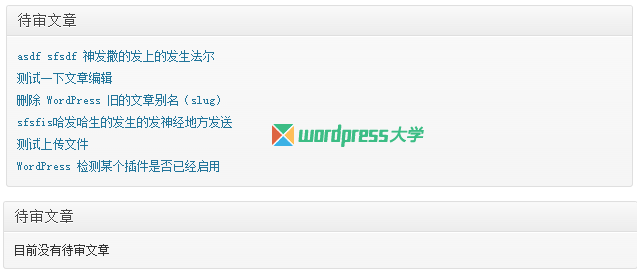
要做到這個(gè),只需要將下面的代碼添加到當(dāng)前主題的 functions.php 文件即可:
/**
 * WordPress 儀表盤顯示待審核的文章列表
 * http://blog.wpjam.com/m/pending-posts-dashboard-widget/
 */
add_action('wp_dashboard_setup', 'wpjam_modify_dashboard_widgets' );
function wpjam_modify_dashboard_widgets() {
	global $wp_meta_boxes;

	if(current_user_can('manage_options')){ //只有管理員才能看到
		add_meta_box( 'pending_posts_dashboard_widget', '待審文章', 'pending_posts_dashboard_widget_function','dashboard', 'normal', 'core' );
	}
}

function pending_posts_dashboard_widget_function() {
	global $wpdb;
	$pending_posts = $wpdb->get_results("SELECT * FROM {$wpdb->posts}  WHERE post_status = 'pending' ORDER BY post_modified DESC");

	if($pending_posts){ //判斷是否有待審文章
		echo '<ul>';
		foreach ($pending_posts as $pending_post){
			echo '<li><a href="'.admin_url().'post.php?post='.$pending_post->ID.'&action=edit">'.$pending_post->post_title.'</a></li>';
		}
		echo '</ul>';
	}else echo '目前沒有待審文章';
}
代碼來自:我愛水煮魚 http://blog.wpjam.com/m/pending-posts-dashboard-widget/,倡萌在源代碼添加了一個(gè)判斷是否有待審文章,如果沒有,顯示提示文字。
聲明:本站所有文章,如無特殊說明或標(biāo)注,均為本站原創(chuàng)發(fā)布。任何個(gè)人或組織,在未征得本站同意時(shí),禁止復(fù)制、盜用、采集、發(fā)布本站內(nèi)容到任何網(wǎng)站、書籍等各類媒體平臺。如若本站內(nèi)容侵犯了原著者的合法權(quán)益,可聯(lián)系我們進(jìn)行處理。




如何讓投稿者 發(fā)的文章,保存為草稿,需要審核通過,投稿者在后臺發(fā)的文章