

即開即裝即用,WordPress 提供了一個自定義注冊表單,可用于建立一個新的用戶,或者將新用戶添加到已有的 WordPress 網(wǎng)站。但是,如果你想實現(xiàn)一個自定義的登記表單,不在WordPress控制面板中顯示的選項?
在本教程中,我們將學(xué)習(xí)如何使用模板標(biāo)簽和簡碼的組合來創(chuàng)建WordPress的自定義登記表單。
默認(rèn)的登記表格只包含兩個表單字段 – 用戶名和電子郵件:

只有用戶名和電子郵件表單字段的存在,使得注冊過程非常容易。首先,您可以輸入您的用戶名和電子郵件之后,密碼會被發(fā)送給您。接下來,您使用網(wǎng)站生成的密碼登錄,然后填寫您的個人資料和更改更加難忘的密碼。
與其讓用戶通過上面的流程來簡單注冊你的網(wǎng)站,為什么不提供一個直入主題的注冊表單,包含一些用戶名和郵箱以外的重要信息,比如密碼、他們的網(wǎng)址、簡介、昵稱以及姓名等等。
這個對于像 Tuts+ 這樣的做作者網(wǎng)站非常有用。
在本文中,我們將建立一個自定義的登記表單插件,具有以下表單字段:
- 用戶名
- 密碼
- 電子郵件
- 網(wǎng)址
- 名字
- 姓氏
- 昵稱
- 簡介
這個自定義注冊表單可以通過模板標(biāo)簽或簡碼集成到 WordPress 網(wǎng)站中。使用這個簡碼,你可以創(chuàng)建一個頁面然后將它設(shè)置為你網(wǎng)站的官方注冊頁面。或者你還可以在文章中使用這個簡碼,讓用戶閱讀完文章以后注冊你的網(wǎng)站。如果你想添加注冊表單到側(cè)邊欄或者你網(wǎng)站的其他任意位置,你可以編輯主題文件,然后添加模板標(biāo)簽到所需的位置。
在我們開始建立登記表單插件,值得注意的是,用戶名,密碼和郵箱字段是必需的。我們會根據(jù)這個規(guī)則來撰寫驗證功能。
構(gòu)建插件
如上所說,讓我們開始插件的代碼。首先,包含插件頭。
<?php
/*
  Plugin Name: Custom Registration
  Plugin URI: http://code.tutsplus.com
  Description: Updates user rating based on number of posts.
  Version: 1.0
  Author: Agbonghama Collins
  Author URI: http://tech4sky.com
 */
接下來,我們創(chuàng)建一個PHP函數(shù)包含報名表單的HTML代碼。
function registration_form( $username, $password, $email, $website, $first_name, $last_name, $nickname, $bio ) {
    echo '
    <style>
    div {
        margin-bottom:2px;
    }

    input{
        margin-bottom:4px;
    }
    </style>
    ';

    echo '
    <form action="' . $_SERVER['REQUEST_URI'] . '" method="post">
    <div>
    <label for="username">Username <strong>*</strong></label>
    <input type="text" name="username" value="' . ( isset( $_POST['username'] ) ? $username : null ) . '">
    </div>

    <div>
    <label for="password">Password <strong>*</strong></label>
    <input type="password" name="password" value="' . ( isset( $_POST['password'] ) ? $password : null ) . '">
    </div>

    <div>
    <label for="email">Email <strong>*</strong></label>
    <input type="text" name="email" value="' . ( isset( $_POST['email']) ? $email : null ) . '">
    </div>

    <div>
    <label for="website">Website</label>
    <input type="text" name="website" value="' . ( isset( $_POST['website']) ? $website : null ) . '">
    </div>

    <div>
    <label for="firstname">First Name</label>
    <input type="text" name="fname" value="' . ( isset( $_POST['fname']) ? $first_name : null ) . '">
    </div>

    <div>
    <label for="website">Last Name</label>
    <input type="text" name="lname" value="' . ( isset( $_POST['lname']) ? $last_name : null ) . '">
    </div>

    <div>
    <label for="nickname">Nickname</label>
    <input type="text" name="nickname" value="' . ( isset( $_POST['nickname']) ? $nickname : null ) . '">
    </div>

    <div>
    <label for="bio">About / Bio</label>
    <textarea name="bio">' . ( isset( $_POST['bio']) ? $bio : null ) . '</textarea>
    </div>
    <input type="submit" name="submit" value="Register"/>
    </form>
    ';
}
注意到注冊字段被傳遞給上述函數(shù)作為變量?在功能代碼,你會看到下面的代碼實例,例如:
( isset( $_POST['lname'] ) ? $last_name : null )
這個三元運算符會檢查 $_POST 這個全局?jǐn)?shù)組的內(nèi)容中是否包含一個值,如果包含,就賦予表單字段這個值,這樣就可以節(jié)約用戶重新輸入字段的時間。
一個注冊表單還沒有完成,直到你驗證和消毒用戶輸入的內(nèi)容。因此,我們將創(chuàng)建一個名為 registration_validation 的驗證函數(shù)。
為了減輕負(fù)擔(dān),我們直接使用 WordPress 的 WP_Error 類,下面一起來編寫驗證功能:
1.創(chuàng)建該函數(shù),將注冊字段作為函數(shù)參數(shù)。
function registration_validation( $username, $password, $email, $website, $first_name, $last_name, $nickname, $bio ) {
2.實例化 WP_Error 類,將該實例設(shè)為全局變量,確保它可以在函數(shù)的范圍之外訪問。
global $reg_errors;
$reg_errors = new WP_Error;
3.記住:我們剛才說的 用戶名、密碼和郵箱是必需的,不能留空的。要實施此規(guī)則,我們需要檢查這些字段是否為空。如果為空,我們就追加錯誤信息到全局 WP_Error 類。
if ( empty( $username ) || empty( $password ) || empty( $email ) ) {
    $reg_errors->add('field', 'Required form field is missing');
}
4.我們還要檢查和確認(rèn)用戶名的位數(shù)不少于 4
if ( 4 > strlen( $username ) ) {
    $reg_errors->add( 'username_length', 'Username too short. At least 4 characters is required' );
}
5.檢查用戶名是否已被注冊
if ( username_exists( $username ) )
    $reg_errors->add('user_name', 'Sorry, that username already exists!');
6.使用 WordPress 的 validate_username 函數(shù)驗證用戶名是否有效
if ( ! validate_username( $username ) ) {
    $reg_errors->add( 'username_invalid', 'Sorry, the username you entered is not valid' );
}
7.確保用戶輸入的密碼位數(shù)不少于 5 個字符
if ( 5 > strlen( $password ) ) {
        $reg_errors->add( 'password', 'Password length must be greater than 5' );
    }
8.檢查郵箱是否有效
if ( !is_email( $email ) ) {
    $reg_errors->add( 'email_invalid', 'Email is not valid' );
}
9.檢查郵箱是否已注冊
if ( email_exists( $email ) ) {
    $reg_errors->add( 'email', 'Email Already in use' );
}
10.如果網(wǎng)址字段已填寫,檢查是否有效
if ( ! empty( $website ) ) {
    if ( ! filter_var( $website, FILTER_VALIDATE_URL ) ) {
        $reg_errors->add( 'website', 'Website is not a valid URL' );
    }
}
11.最后,我們循環(huán)在 WP_Error 實例中的錯誤信息,并各自顯示
if ( is_wp_error( $reg_errors ) ) {

    foreach ( $reg_errors->get_error_messages() as $error ) {

        echo '<div>';
        echo '<strong>ERROR</strong>:';
        echo $error . '<br/>';
        echo '</div>';

    }

}
到這里,我們已經(jīng)完成了驗證函數(shù)。
下一步,創(chuàng)建 complete_registration() 函數(shù)來處理用戶注冊。
用戶注冊實際上由 wp_insert_user 函數(shù)完成,它可以接受用戶數(shù)據(jù)數(shù)組。
function complete_registration() {
    global $reg_errors, $username, $password, $email, $website, $first_name, $last_name, $nickname, $bio;
    if ( 1 > count( $reg_errors->get_error_messages() ) ) {
        $userdata = array(
        'user_login'    =>   $username,
        'user_email'    =>   $email,
        'user_pass'     =>   $password,
        'user_url'      =>   $website,
        'first_name'    =>   $first_name,
        'last_name'     =>   $last_name,
        'nickname'      =>   $nickname,
        'description'   =>   $bio,
        );
        $user = wp_insert_user( $userdata );
        echo 'Registration complete. Goto <a href="' . get_site_url() . '/wp-login.php">login page</a>.';
    }
}
在上面的 complete_registration() 函數(shù),我們將 $reg_errors 和 WP_Error 示例,以及表單字段設(shè)置為全局變量,以便我們可以在全局范圍中訪問。
然后我們檢查 $reg_errors 錯誤處理實例是否包含錯誤。如果沒有錯誤,我們就填充 $userdata 數(shù)組并將用戶注冊資料寫入 WordPress 數(shù)據(jù)庫,并且顯示注冊完成信息和鏈接到注冊頁面的地址。
回到上一層,custom_registration_function() 函數(shù)使我們上面創(chuàng)建的函數(shù)投入使用。
function custom_registration_function() {
    if ( isset($_POST['submit'] ) ) {
        registration_validation(
        $_POST['username'],
        $_POST['password'],
        $_POST['email'],
        $_POST['website'],
        $_POST['fname'],
        $_POST['lname'],
        $_POST['nickname'],
        $_POST['bio']
        );

        // sanitize user form input
        global $username, $password, $email, $website, $first_name, $last_name, $nickname, $bio;
        $username   =   sanitize_user( $_POST['username'] );
        $password   =   esc_attr( $_POST['password'] );
        $email      =   sanitize_email( $_POST['email'] );
        $website    =   esc_url( $_POST['website'] );
        $first_name =   sanitize_text_field( $_POST['fname'] );
        $last_name  =   sanitize_text_field( $_POST['lname'] );
        $nickname   =   sanitize_text_field( $_POST['nickname'] );
        $bio        =   esc_textarea( $_POST['bio'] );

        // call @function complete_registration to create the user
        // only when no WP_error is found
        complete_registration(
        $username,
        $password,
        $email,
        $website,
        $first_name,
        $last_name,
        $nickname,
        $bio
        );
    }

    registration_form(
        $username,
        $password,
        $email,
        $website,
        $first_name,
        $last_name,
        $nickname,
        $bio
        );
}
讓我解釋一下 custom_registration_function() 函數(shù)的代碼。
首先,我們通過檢查 $_POST[‘submit’] 是否設(shè)置來判斷表單是否已提交。如果已提交,就調(diào)用 registration_validation 函數(shù)驗證用戶提交的數(shù)據(jù)。然后我們消毒表單數(shù)據(jù),并為消毒好的數(shù)據(jù)設(shè)置變量名。最后調(diào)用 complete_registration 注冊用戶。
我們需要調(diào)用 registration_form 函數(shù)顯示注冊表單。
記得我提到過要為該插件提供簡碼支持,下面就是構(gòu)建簡碼的代碼。
// Register a new shortcode: [cr_custom_registration]
add_shortcode( 'cr_custom_registration', 'custom_registration_shortcode' );

// The callback function that will replace [book]
function custom_registration_shortcode() {
    ob_start();
    custom_registration_function();
    return ob_get_clean();
}
到這里,我們就完成了整個插件的代碼啦!下面就是最終的效果,當(dāng)然了,還需要你自己添加 css 樣式才能達(dá)到下面的顯示效果。
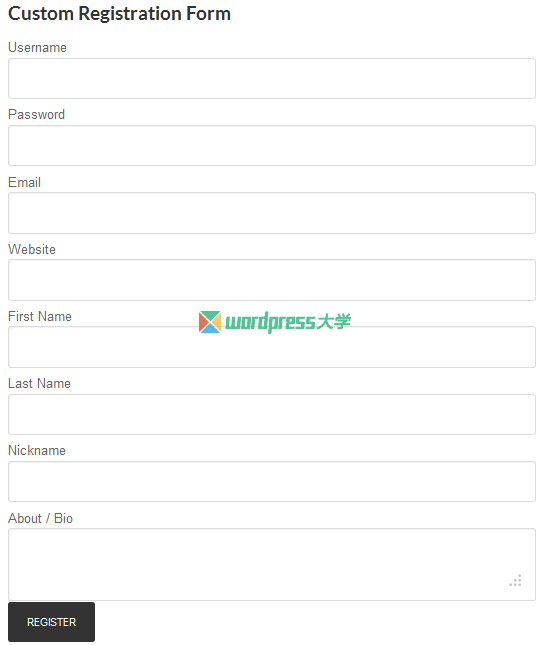
插件用法
要在 WordPress 文章或頁面中顯示這個注冊表單,可以使用下面的簡碼
[cr_custom_registration]
要在你主題的特定位置顯示注冊表單,你可以添加下面的模板標(biāo)簽進(jìn)行調(diào)用
<?php custom_registration_function(); ?>
你可以在這里下載本文制作好的插件:Custom Registration Form Plugin | 本站備用下載地址
小結(jié)
在這篇文章中,我們完成了創(chuàng)建 WordPress 自定義注冊表單插件的整個流程。你可以進(jìn)一步拓展該插件添加更多額外的字段,比如 用戶角色、社交網(wǎng)絡(luò)信息等等,但是要確保表單字段的值是一個對 wp_insert_user 有效的元數(shù)據(jù)。
如果你有任何問題和建議,可以提交評論交流。
- 英文原版:http://code.tutsplus.com/tutorials/creating-a-custom-wordpress-registration-form-plugin–cms-20968
- 翻譯:倡萌@WordPress大學(xué) http://www.ydqwiac.cn/creating-a-custom-wordpress-registration-form-plugin.html




?? 準(zhǔn)備即用于網(wǎng)站。。。
你好 我用了這個插件,注冊了用戶,查看mysql表數(shù)據(jù)的時候,發(fā)現(xiàn)這個用戶注冊的密碼字段沒有數(shù)據(jù),但是密碼是有填寫的,請教下,謝謝
插件下載了,安裝在站內(nèi),不知怎么設(shè)置,請指教
? ? 學(xué)習(xí)PHP中
著實是看不懂
不需要此功能~~
好長的一篇文章。。。